

What Is OAuth 2.0? Authentication Explained for Developers
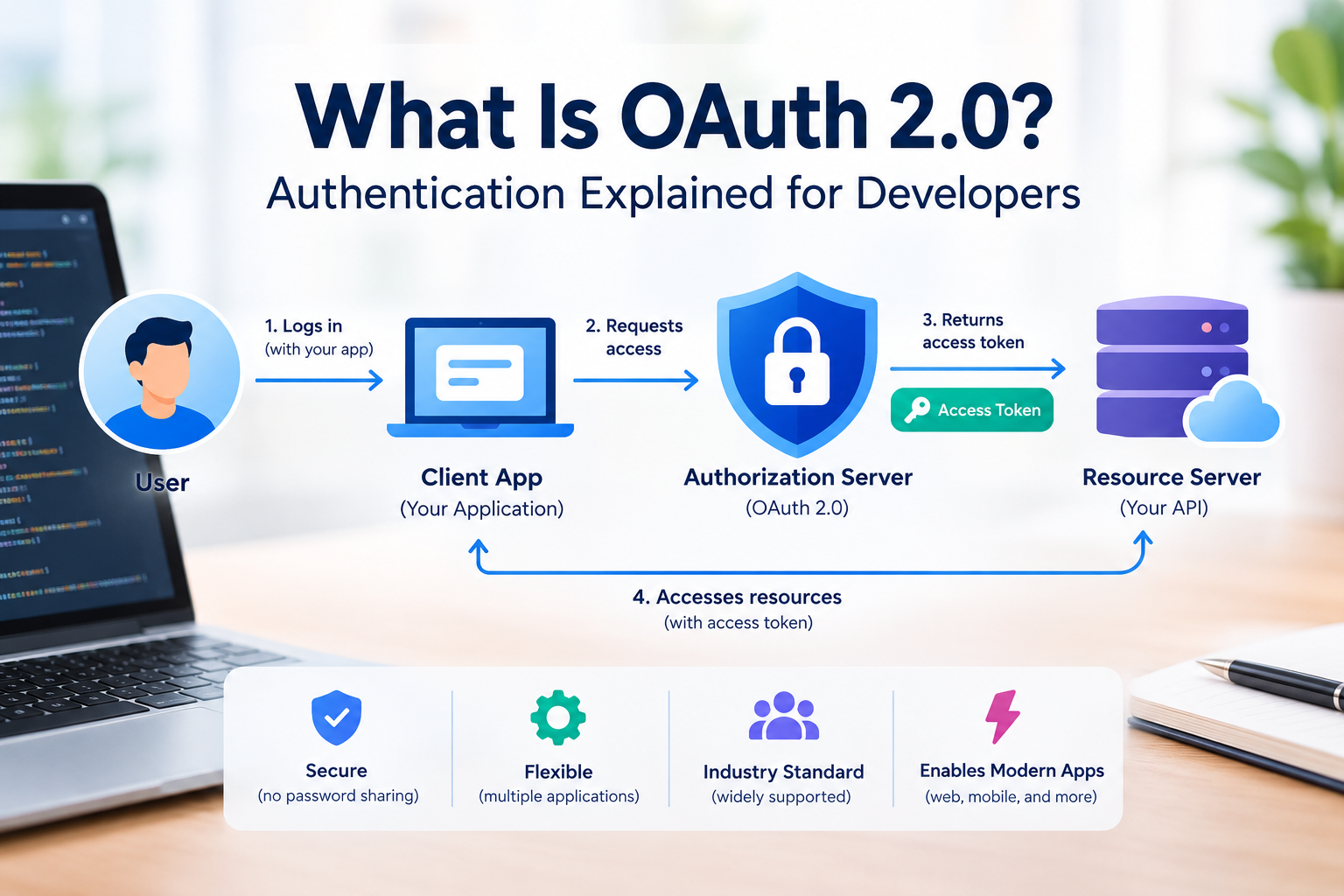
OAuth 2.0 is an authorization framework that allows applications to access protected resources without asking users to share their passwords with third-party apps. Developers use it to secure APIs, manage permissions, and grant applications limited access to user data.
However, OAuth 2.0 is not an authentication protocol by itself. It primarily handles authorization, while OpenID Connect (OIDC) adds an identity layer for applications that need to verify who a user is.
Understanding this difference helps developers build more secure login systems, web applications, mobile apps, and API integrations.
Key Takeaways
OAuth 2.0 allows applications to access protected resources with permission.
Authentication verifies identity, while authorization determines access rights.
Access tokens allow clients to call protected APIs without using a user's password.
The authorization code flow with PKCE is the recommended starting point for most user-based applications.
OpenID Connect adds authentication capabilities to OAuth 2.0.
Secure redirect URIs, token storage, HTTPS, and limited scopes are essential security practices.
What Is OAuth 2.0?
OAuth 2.0, short for Open Authorization 2.0, is an industry-standard framework for delegated authorization. It lets an application obtain limited access to a user's resources through an authorization server.
For example, imagine you want to connect a calendar application to your Google account. Instead of giving the calendar app your Google password, you authorize it to access the calendar information it needs. The application receives an access token and uses it to make permitted API requests.
The calendar application does not need to handle your account password directly.
According to the OAuth 2.0 Authorization Framework specification, this separation between user credentials and delegated access is a central part of OAuth's design.
Developers commonly use OAuth 2.0 for:
Connecting applications to third-party APIs.
Granting limited access to user accounts and files.
Securing backend services and API requests.
Integrating cloud services and business platforms.
Managing application permissions without sharing passwords.
Authentication vs. Authorization: What Is the Difference?
Authentication and authorization are related, but they solve different problems.
Authentication answers the question, "Who are you?"
Authorization answers the question, "What are you allowed to access?"
Consider a project management application. A user signs in with an identity provider, which verifies their identity. The application then checks whether that user can view a particular project or edit its settings.
These are separate security decisions.
| Feature | Authentication | Authorization |
|---|---|---|
| Main Purpose | Verifies a user's identity | Determines what a user can access |
| Key Question | Who are you? | What are you allowed to do? |
| Common Technologies | OpenID Connect, passkeys, multi-factor authentication | OAuth 2.0, role-based access control (RBAC), access policies |
| When It Happens | Usually during sign-in | After or during identity verification |
| Example | Signing in to an application | Allowing access to a calendar API |
| Main Focus | User identity | User permissions |
| Outcome | Confirms who the user is | Grants or denies access to resources |
OAuth 2.0 is primarily designed for authorization. When developers need to implement sign-in, they generally use OpenID Connect on top of OAuth 2.0.
This distinction matters because receiving an access token does not automatically prove a user's identity to the client application.
How Does OAuth 2.0 Work?
An OAuth 2.0 flow involves several parties working together to grant and enforce access.
The Four Main OAuth 2.0 Roles
Resource owner
The resource owner is the person or entity that controls the protected information. In a typical application, this is the user who grants permission.
Client application
The client is the application requesting access. It could be a website, mobile app, desktop program, or backend service.
Authorization server
The authorization server handles authorization requests, authenticates users when necessary, obtains consent where required, and issues access tokens.
Resource server
The resource server hosts protected resources, such as user profiles, documents, or calendar events. It validates access tokens before providing access.
Also Read: Cybersecurity Tips Everyone Should Follow to Stay Safe Online
Step-by-Step OAuth 2.0 Flow
A common authorization code flow works as follows:
The user selects an option such as "Connect your account."
The application redirects the user to the authorization server.
The authorization server authenticates the user and obtains authorization for the requested permissions.
The authorization server redirects the user back to the registered application URL with a temporary authorization code.
The application exchanges the code for an access token through the token endpoint.
The application sends the access token to the resource server when requesting protected information.
The resource server validates the token and checks whether it permits the requested operation.
The application can then access only the resources allowed by the granted permissions.
The authorization code flow also helps keep access tokens out of the browser's initial authorization redirect. Modern implementations should combine this flow with PKCE.
Important OAuth 2.0 Components
OAuth 2.0 relies on several terms that developers should understand before implementing it.
Access Token
An access token represents authorization to access specific resources. The client presents it when calling a protected API.
A common HTTP request looks like this:
GET /api/profile HTTP/1.1
Host: api.example.com
Authorization: Bearer ACCESS_TOKEN
The example uses a placeholder rather than a real credential. The resource server must validate the token and its permissions before returning the profile.
Access tokens may be opaque strings or structured tokens. Developers should not assume that every access token is a JWT or that they can safely interpret its contents.
Refresh Token
A refresh token can be used to obtain a new access token when the existing one expires, subject to the authorization server's rules.
Refresh tokens typically require stronger protection because they may allow an application to obtain additional access tokens without asking the user to authorize again.
Store them securely, follow provider-specific rotation and expiration rules, and never expose them in client-side code unnecessarily.
Scope
A scope describes the access an application requests. For example, an API might offer separate permissions for reading calendar events and creating new ones.
Applications should request only the scopes they need. Smaller permission sets reduce the potential damage if a token is compromised.
Authorization Code
An authorization code is a temporary credential returned through the authorization redirect. The client exchanges it for an access token.
The code is not the same as an access token and should not be treated as one.
Redirect URI
The redirect URI specifies where the authorization server returns the user after an authorization request. It must be registered and validated carefully to prevent attackers from redirecting authorization responses to an untrusted destination.
OAuth 2.0 Grant Types and Flows
Different application types require different authorization flows.
| Flow | Typical Use Case | Developer Guidance |
|---|---|---|
| Authorization Code with PKCE | Web, mobile, and single-page applications | Preferred flow for user-based authorization |
| Client Credentials | Server-to-server communication | Use when an application acts on its own behalf |
| Device Authorization | Devices with limited input capabilities | Suitable for supported smart TVs, gaming consoles, and similar devices |
| Refresh Token | Renewing access tokens | Protect refresh tokens and follow rotation rules where supported |
Authorization Code Flow with PKCE
PKCE stands for Proof Key for Code Exchange. It protects the authorization code flow against certain code interception and injection attacks.
The client creates a secret verifier and derives a challenge from it. The authorization request includes the challenge, and the token request includes the original verifier. The authorization server checks that they match.
This helps prevent an intercepted authorization code from being exchanged by an attacker who does not possess the verifier.
Use authorization code with PKCE for modern user-based applications, including public clients such as mobile apps and browser-based applications. Confidential server-side clients should also use PKCE.
Client Credentials Flow
The client credentials flow is designed for machine-to-machine communication when an application requests access using its own identity rather than acting on behalf of an individual user.
For example, one backend service might request permission to access another internal service.
Client credentials must be protected using an appropriate server-side credential management approach. This flow is not a substitute for a user sign-in process.
Which Flows Should Developers Avoid?
The current OAuth security best practices advise developers not to use the implicit grant or the resource owner password credentials grant for new implementations.
The implicit grant exposes tokens to additional risks in browser-based authorization responses. The password grant requires the client to handle the user's password directly.
The OAuth 2.0 Security Best Current Practice, RFC 9700, documents these and other security recommendations.
OAuth 2.0 vs. OpenID Connect
OAuth 2.0 and OpenID Connect are closely related, but they are not interchangeable.
OAuth 2.0 provides delegated authorization. OpenID Connect extends OAuth 2.0 with standardized authentication features, including the ID token.
An ID token communicates authentication information to the client. An access token is intended for accessing protected resources at an API or resource server.
Developers implementing "Sign in with Google" or another identity-provider login should use the provider's OpenID Connect implementation rather than treating any successful OAuth token response as proof of identity.
| Feature | OAuth 2.0 | OpenID Connect (OIDC) |
|---|---|---|
| Primary Purpose | Authorization | Authentication and user identity |
| Access Token | Used to access protected resources | Used to access authorized APIs |
| ID Token | Not defined by core OAuth 2.0 | Defines an ID token containing user identity claims |
| Typical Use | Granting an application access to an API | Signing users in to an application |
| Main Focus | Permissions and resource access | Verifying user identity |
| Standard | Authorization framework | Identity layer built on OAuth 2.0 |
OAuth 2.0 Security Best Practices
OAuth improves access control, but an insecure implementation can still expose user data or application credentials.
Use HTTPS
Use HTTPS for authorization endpoints, token exchanges, redirect destinations, and API requests. Encrypted connections help protect credentials and tokens while they travel across the network.
Implement PKCE
Use PKCE with the authorization code flow. Follow the authorization server's requirements for generating the verifier and challenge.
Validate Redirect URIs Exactly
Register specific redirect URIs and avoid permissive wildcard matching. Incorrect redirect validation can expose authorization codes to an attacker-controlled destination.
Protect Tokens
Do not put access tokens in URL query parameters. URLs can appear in browser history, server logs, analytics systems, and referrer data.
Use the authorization header for bearer-token API requests. Protect refresh tokens with appropriate storage, access restrictions, and rotation or revocation controls where supported.
Limit Scopes
Request only the permissions required for the feature being implemented. Avoid requesting broad access simply because it may be useful later.
Never Expose Client Secrets
A client secret must not be embedded in publicly accessible JavaScript or shipped inside a mobile application. Browser-based and native applications cannot reliably keep a static secret confidential.
Use an appropriate public-client flow or a secure backend architecture instead.
Validate Tokens Correctly
Resource servers must validate tokens according to their issuer's requirements. Depending on the token type, this may involve signature verification, issuer and audience checks, expiration checks, and scope or permission validation.
Do not accept a token simply because it looks like a JWT or contains a familiar username.
For additional guidance, consult RFC 9700 and the relevant identity provider's official documentation.
Common OAuth 2.0 Mistakes Developers Make
Even experienced developers can introduce security problems when implementing OAuth.
Confusing authentication with authorization: Use OpenID Connect when you need standardized user authentication.
Skipping PKCE: Modern authorization code flows should include PKCE.
Using the wrong flow: Choose the flow according to the application's architecture and whether a user is involved.
Storing tokens carelessly: Avoid exposing tokens in logs, URLs, source code, or insecure persistent storage.
Trusting client-side permissions: Enforce authorization checks on the server, not only in the interface.
Ignoring token expiration: Handle expired access tokens and refresh failures safely.
Using broad scopes: Request the minimum access necessary for the application to work.
A secure implementation depends on the complete flow, including the client, authorization server, resource server, token lifecycle, and application-level access controls.
When Should Developers Use OAuth 2.0?
OAuth 2.0 is useful when applications need controlled access to protected APIs or resources.
For example, developers may use it to connect a reporting dashboard to a customer's account, allow a scheduling application to access calendar data, or authorize one backend service to call another.
Before implementation, identify the application type, the protected resources, the permissions required, and whether the workflow involves a user or a service acting independently.
Then select a supported flow, configure redirect URIs where applicable, implement token validation, and review the provider's security documentation.
For many user-based applications, authorization code with PKCE is the appropriate starting point. For authentication, use OpenID Connect alongside OAuth 2.0.
Conclusion
OAuth 2.0 provides a standardized way to grant applications limited access to protected resources without sharing a user's password with every application involved.
For developers, the most important concepts are authorization servers, resource servers, access tokens, scopes, authorization codes, and secure token handling. Understanding the difference between OAuth 2.0 and OpenID Connect is equally important when building login functionality.
Choose the correct flow, implement PKCE, validate redirect URIs, and protect credentials throughout the token lifecycle. These practices provide a stronger foundation for secure API integrations and modern application development.
Frequently Asked Questions
- What is OAuth 2.0 in simple terms?
OAuth 2.0 is a framework that allows an application to access protected resources with permission. It uses access tokens instead of requiring the application to collect the user's account password.
- Is OAuth 2.0 used for authentication or authorization?
OAuth 2.0 is primarily used for authorization. Developers typically use OpenID Connect, which builds on OAuth 2.0, when they need to authenticate users and receive standardized identity information.
- What is the difference between an access token and a refresh token?
An access token is used to access protected resources. A refresh token can be exchanged for a new access token when permitted by the authorization server. Refresh tokens generally require more careful long-term protection.
- Is OAuth 2.0 secure?
OAuth 2.0 can support secure authorization when implemented correctly. Developers should use current security guidance, HTTPS, PKCE, strict redirect URI validation, limited scopes, and secure token storage. The protocol alone does not guarantee that an application is secure.
- What is the recommended OAuth 2.0 flow for modern applications?
Authorization code with PKCE is the recommended starting point for most applications that authorize access on behalf of users. Server-to-server applications may use the client credentials flow when appropriate. The final choice depends on the application type and authorization requirements.